
Understanding the Team Home Dashboard
Overview
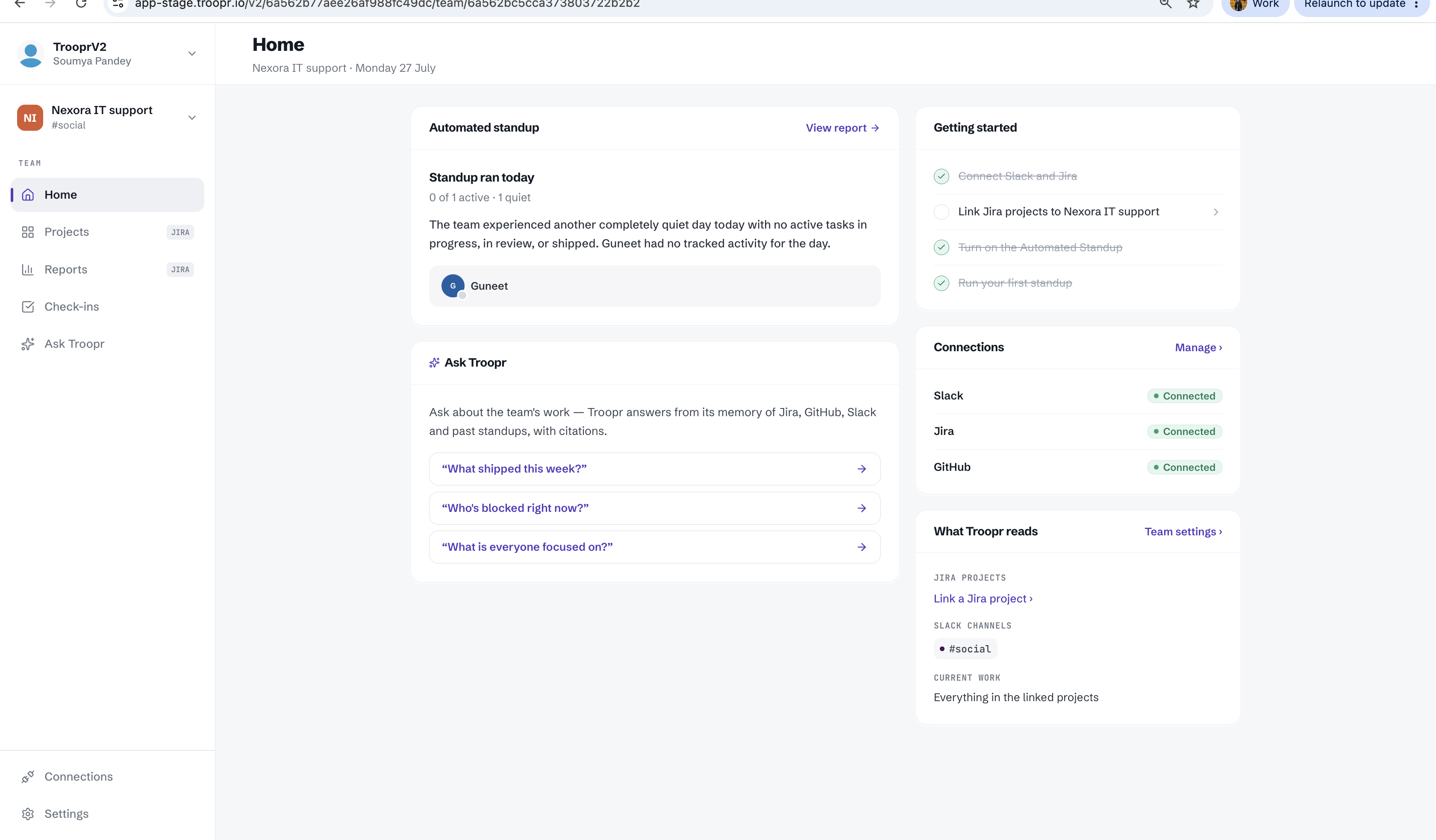
The Team Home dashboard serves as your central command center in the Troopr web app. It provides a high-level view of your team's productivity, active integrations, and the knowledge base powering your AI interactions. Whether you are checking the status of your automated workflows or managing data sources, the Team Home dashboard keeps everything in one place.
Automated Standup Summary
At the top of your dashboard, you will find the Automated Standup summary. This section aggregates responses from your team's recent check-ins, allowing you to quickly identify blockers, see what has been completed, and stay aligned on current goals without digging through Slack history.
Ask Troopr AI Search
The dashboard features a prominent search interface powered by Troopr AI. You can ask questions in natural language to retrieve information across your connected tools. The AI doesn't just find documents; it synthesizes answers based on the permissions and data sources configured in your workspace.
Connections Status
Monitoring the health of your integrations is vital for ensuring seamless automation. The Connections section displays the real-time status of your primary platforms:
Slack: Ensures the Troopr bot is active and able to communicate with your channels.
Jira: Confirms the link between your Slack workspace and Jira projects for issue tracking and updates.
GitHub: Tracks the connection to your repositories, enabling Troopr to pull pull-request data and activity logs.
If any connection requires re-authorization or setup, you will see a prompt directly within this module.
What Troopr Reads
This section outlines the specific data sources that feed Troopr’s intelligence. By managing these sources, you control what information the AI uses to answer your team's queries. The primary categories include:
Jira: Indexes ticket descriptions and comments to help answer questions about project history.
Slack Channel : Reads team's activites across slack channel.
GitHub: Tracks the activities across your repositories, enabling Troopr to pull activity logs.
You can add or remove sources at any time to ensure the AI's knowledge remains relevant and secure.